Table of Contents
- Pending for Planning: Streamlined Order Preparation and Dispatch
- Adaptive Multi-Part Stop (MPS): Intelligent Order Grouping for Maximum Fleet Efficiency
- Optimise Driver Assignments with Skill-Based Route Planning
- Streamline Shipper Returns with the Return Outbound Scan
- Prevent Vehicle Overloading with Real-Time Capacity Alerts
Let Our Experts Optimize Your Deliveries Today
Let's talkPending for Planning: Streamlined Order Preparation and Dispatch
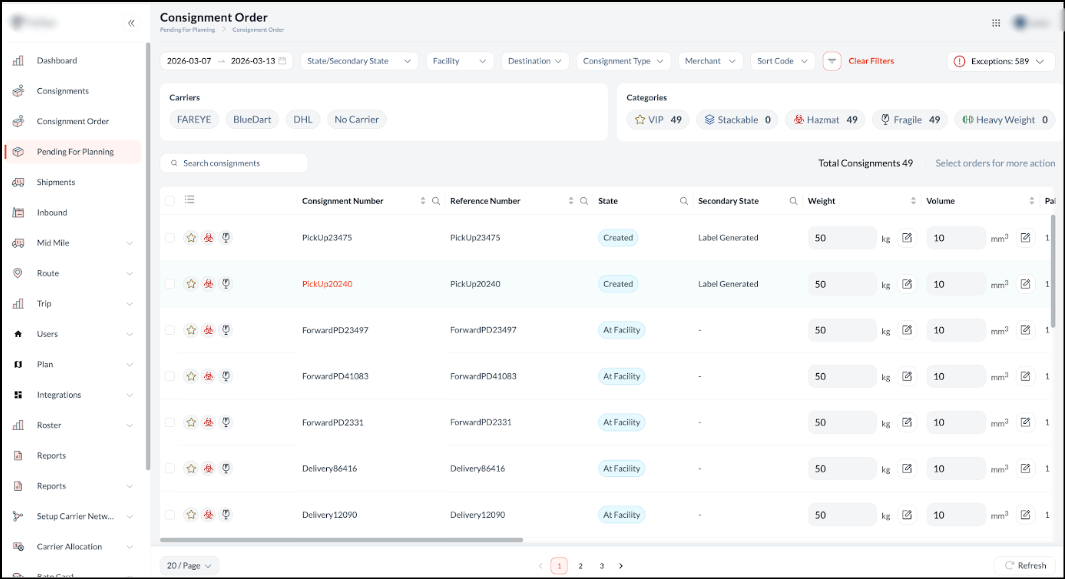
Introducing the Pending for Planning module, a dedicated centralised interface designed to accelerate route preparation by displaying all consignments currently awaiting dispatch assignment. This specialised view empowers planners to seamlessly review comprehensive shipment details, monitor real-time operational states, and efficiently organise orders before routing, ensuring a smoother and more accurate planning workflow.
Highlights
- Comprehensive Consignment Data Visibility: Gain instant access to critical planning attributes such as weight, volume, pallet quantities, ship-by dates, and order ageing directly from the data table, ensuring highly informed routing decisions.
- Inline Editing for Key Elements: Quickly modify crucial consignment details like volume, pallet quantity, SKU, and service time directly within the grid without opening multiple screens, significantly accelerating the pre-routing workflow.
- Consignment Tags with Icons: Easily identify specialised shipment requirements or categories at a glance using intuitive, visual icon-based tags (e.g., PERISHABLES).
- Splitting for More Than Truckload: Prevent capacity bottlenecks by easily splitting exceptionally large consignments that exceed standard vehicle limits into smaller, actionable sub-consignments for separate routes.
- Flexible Rescheduling: Seamlessly adjust the expected dispatch or delivery dates for specific consignments directly from the planning view to accommodate last-minute customer requests or operational delays.
- Smart Alerts for Exceptions: Stay ahead of operational roadblocks with automated, proactive alerts featuring a dedicated 'Exceptions' counter at the top right of the interface that instantly flags exceptions like incomplete data or partially received shipments before they disrupt the planning phase.
Advanced Filtering & Bulk Actions: Narrow down the planning queue using detailed operational secondary states (e.g., "Unplanned", "Staging Started", and "Request For Reschedule") and leverage the "Select orders for more action" functionality to manage large volumes simultaneously.
Adaptive Multi-Part Stop (MPS): Intelligent Order Grouping for Maximum Fleet Efficiency
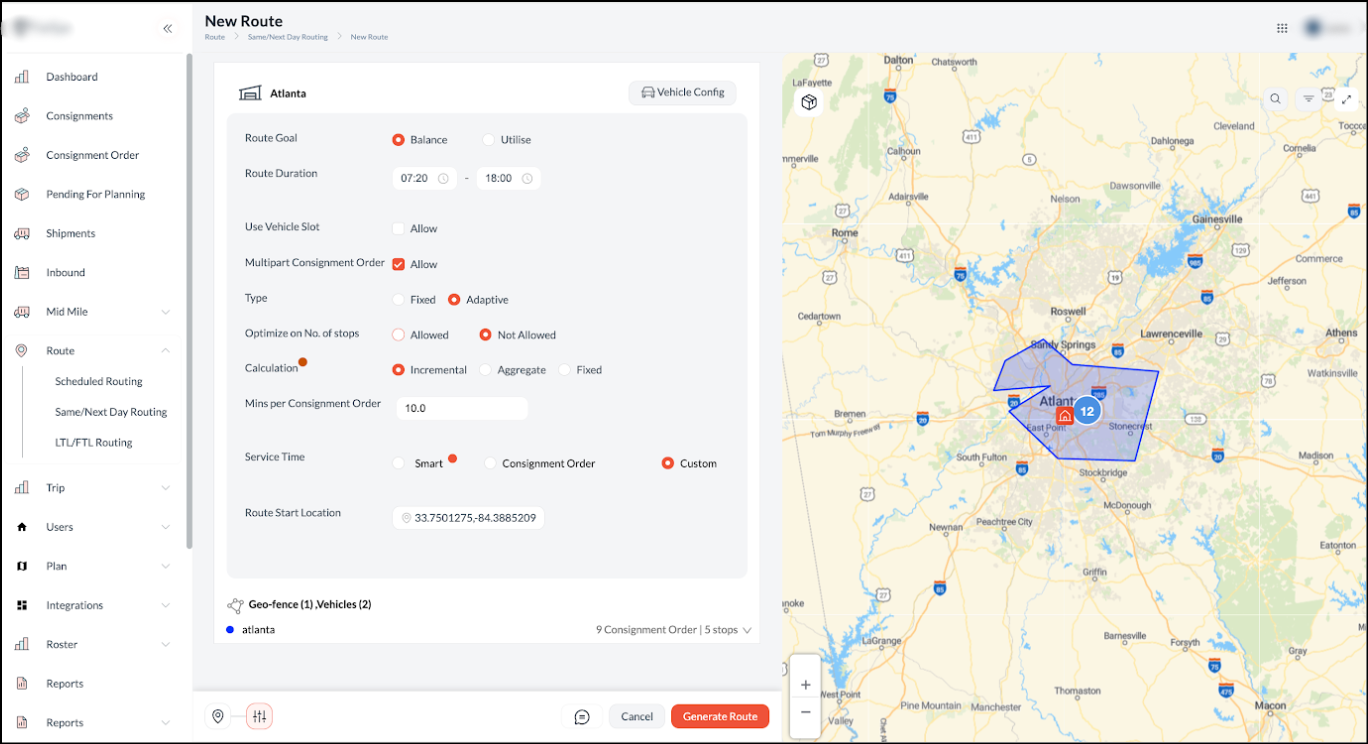
Introducing Adaptive Multi-Part Stop (MPS), a dynamic routing logic designed to maximise fleet capacity by intelligently grouping eligible orders that share the same geographic coordinates or group ID into a single logical stop. By automatically consolidating compatible orders and prioritising single-vehicle assignments, this enhancement minimises redundant visits to the exact same location, ensuring vehicles are utilised to their maximum potential without the need for manual grouping.
Highlights
- Automated Grouping for Reduced Redundancy: Dynamically identifies and groups orders based on matching locations or group IDs, significantly reducing duplicate trips to the same address and lowering overall fuel costs.
- Optimised Capacity Management: Intelligently prioritises single-vehicle assignments for grouped stops, splitting orders across multiple routes only when maximum vehicle limits are breached, thereby maximising fleet utilisation.
- Strict Paired-Order Integrity: Guarantees that the pickup and delivery legs of the same order are always assigned to the same vehicle, maintaining strict order continuity even under complex capacity constraints.
- Highly Accurate Scheduling: Enables flexible stop-level service time calculations using aggregate, incremental, or fixed time modes to produce highly realistic trip schedules and ETAs, eliminating the need for manual scheduling adjustments.
Consignment Order Module: Centralised End-to-End Order Management
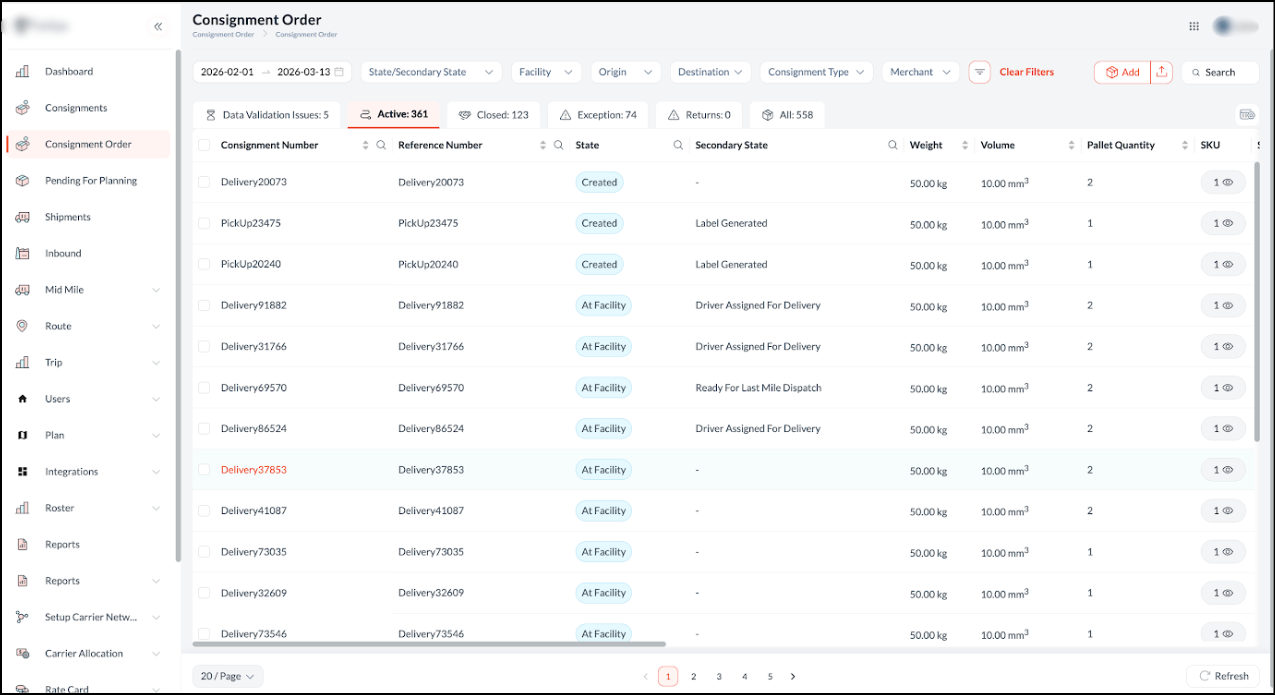
To empower dispatchers and planners with seamless, end-to-end order management, the system now features a centralised consignment order module. This comprehensive hub serves as the primary interface for visualising the entire shipment journey from initial creation to final resolution, eliminating the need to navigate multiple screens and driving rapid, highly informed decision-making.
Highlights
- Dedicated Lifecycle Tabs: Instantly categorise and monitor shipments using built-in status tabs (Active, Closed, Exception, Returns, and All) to easily track overall progress.
- Proactive Data Validation: Resolve roadblocks before they disrupt routing by using the "Data Validation Issues" tab to quickly identify and correct missing fields or errors.
- Granular Shipment Visibility: Review critical planning metrics directly from the main table, including state, secondary state, weight, volume, pallet quantity, and SKU counts.
- Actionable Operational Workflows: Execute everyday tasks such as modifying details, rescheduling deliveries, updating carriers, and generating labels straight from the interface.
- Manual & Bulk Order Creation: Easily create individual orders using the "Add" button or utilise the Import/Upload functionality to seamlessly bring in multiple consignments at once.
- Advanced Dynamic Filtering: Narrow down extensive queues using highly specific criteria, including date range, state/secondary state, facility, origin, destination, consignment type, and merchant.
- Instant Real-Time Search: Locate specific records immediately by typing consignment or reference numbers into the auto-updating search bar.
- Customisable Views & Live Sync: Tailor the grid layout using flexible pagination dropdowns and utilise the dedicated refresh control to instantly fetch the latest shipment data.
- Seamless Bulk Exports: Print or download CSV files directly from the module to support offline analysis and external reporting.
Optimise Driver Assignments with Skill-Based Route Planning
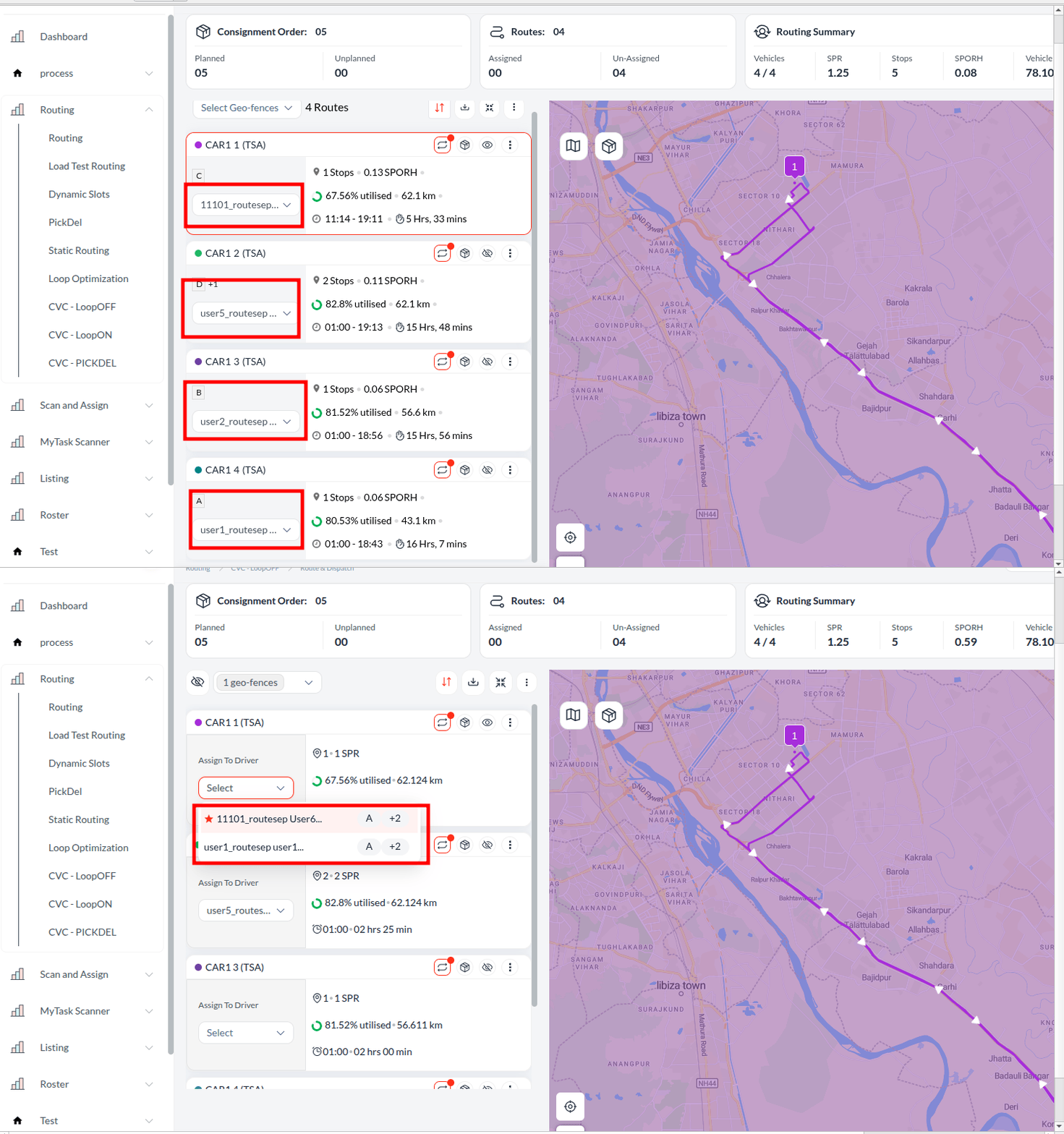
To maximise routing accuracy and minimise manual adjustments, automatic route generation now intelligently evaluates both driver skills and vehicle tags. During route creation across Same/Next Day and Scheduled Routing, the system seamlessly aligns driver capabilities with vehicle attributes, ensuring that only fully compatible orders are assigned to a given route. To further accelerate the dispatch workflow, the system now automatically recommends or pre-selects the most qualified driver for each route based on these overlapping criteria. This automated capability prevents mismatched assignments and ensures optimised, ready-to-dispatch routes by default, without requiring any additional manual configuration.
Streamline Shipper Returns with the Return Outbound Scan
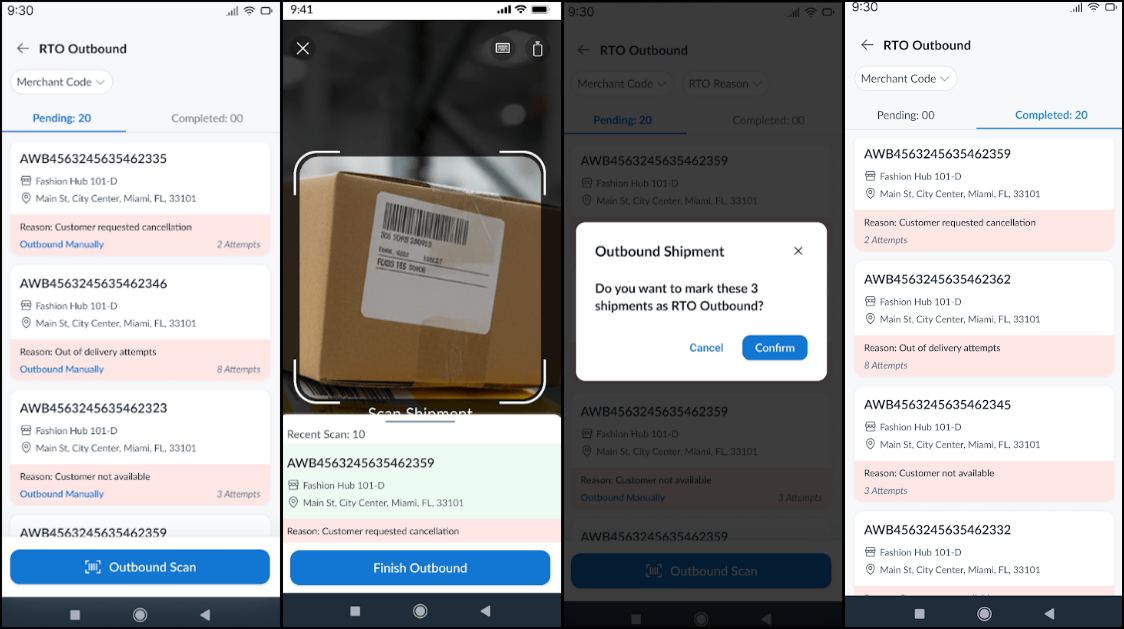
To streamline RTO (Return to Origin) operations and accurately manage consignments returning to the shipper, the mobile app now features a dedicated Return Outbound Scan module. Facility managers can quickly view "Return Initiated" consignments and automatically transition them to "Return In Progress" or "Out for Return" by simply scanning orders as they are moved out from the hub for RTO. This mobile-first enhancement completely eliminates manual tracking, delivering a digitally verified dispatch process with real-time visibility directly from the hub floor.
Prevent Vehicle Overloading with Real-Time Capacity Alerts
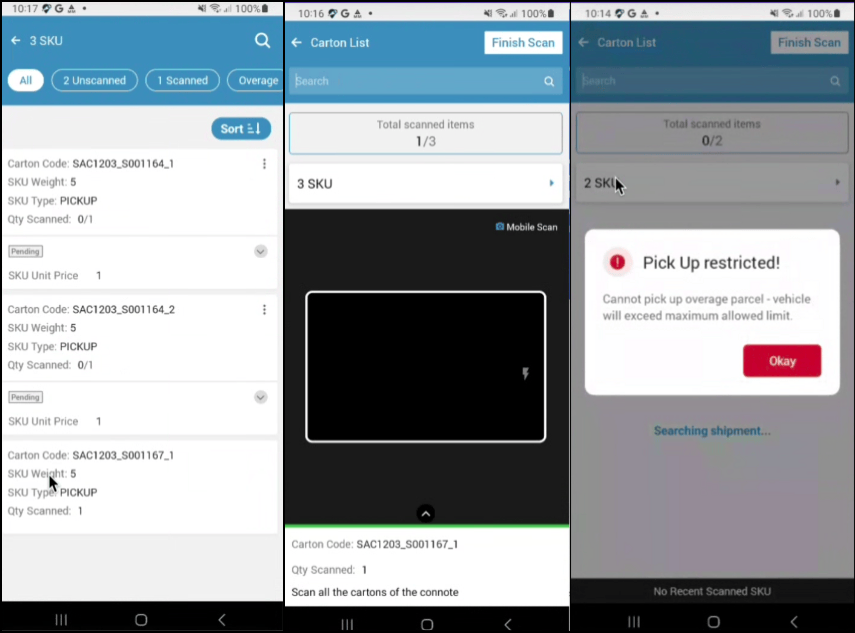
To guarantee strict operational compliance and prevent vehicle overloading, comprehensive weight and volume checks have been deeply integrated into the driver's mobile app. The system now calculates real-time capacity at both the order and SKU levels, providing drivers with precise visibility into current running weights directly on their tabbed and clubbed views. When a driver attempts to add an unplanned overage order during a stop, the system instantly evaluates the combined weight of the existing and overage orders against the vehicle's maximum capacity. Depending on specific account configurations, this validation triggers either advisory alerts or strict hard stops to block the addition, ensuring load limits are never accidentally breached. Coupled with flexible regional unit customisations and a newly planned SKU list view, this enhancement empowers teams to safely, accurately, and confidently manage vehicle capacities throughout the entire delivery lifecycle.
Highlights
- Comprehensive Capacity Controls: Enforce strict weight and volume compliance directly within the mobile app, with validations applied intelligently at both the order and SKU levels.
- Intelligent Overage Validation: Automatically calculates the sum of the current running weight and the new overage items to confirm whether a driver is exceeding their vehicle's maximum capacity.
- Configurable Breach Alerts: Triggers customisable advisory alerts or strict hard stops during capacity breaches, allowing businesses to either strictly block drivers from adding overage items or permit them to proceed with an informational prompt.
- Real-Time Load Visibility: Displays live vehicle weight and volume directly on the tabbed and clubbed views.
- Flexible Unit Customisation: Seamlessly customise the standard unit of measurement for weight and volume at the account or carrier level to support diverse geographical regions.