Table of Contents
- Build and Share Analytics Instantly with Analyse DIY
- Prevent Double-Booking through Smart Route Assignment
- Streamline Master Data Updates via Bulk Uploads
- Ensure Accurate Assignments with Active Driver Tags
- Smarter Route Resequencing with Live Capacity Visibility
- Ensure Accurate Deliveries with AI-Powered POD Validation
- Faster Order Preparation with Custom Pick Lists
Let Our Experts Optimize Your Deliveries Today
Let's talkBuild and Share Analytics Instantly with Analyse DIY
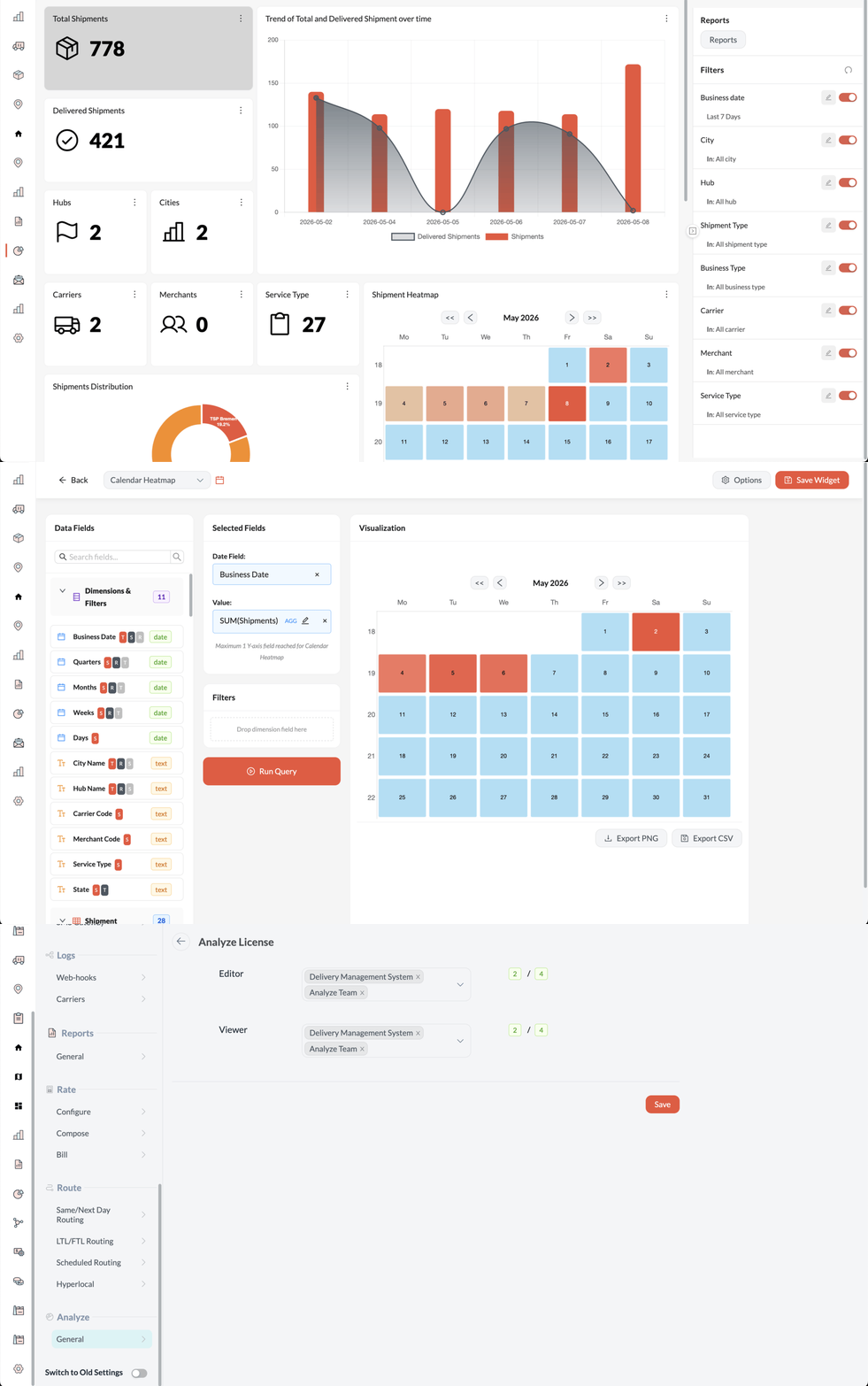
Analyse DIY upgrades your analytics experience from fixed, pre-built dashboards to a customisable, self-service platform. Users now have direct control to quickly build, tailor, and share their own dashboards, significantly reducing the time and costs it takes to get valuable business insights.
Key Highlights:
- Self-Service Builder: Create, pin, and share unlimited custom dashboards directly from your data without needing any backend IT support.
- Reusable Widget Library: Build a chart once and easily reuse it across multiple dashboards to ensure consistent reporting across your teams.
- Expanded Chart Options: Visualise your data exactly how you want with new options like heatmaps, scatter plots, radar charts, and big number metrics.
- Faster Performance & Sharing: Enjoy much faster load times and the ability to securely import or export dashboard templates globally.
- Built-in Access Control: Easily manage Editor and Viewer licenses directly within the platform to easily distribute information across your organisation and clients, as well as to keep your data secure without relying on external IT help.
Prevent Double-Booking through Smart Route Assignment
To give dispatchers more flexibility and maximise available workforce capacity, the routing screen now allows you to assign the same driver to multiple routes as long as their route times do not overlap. The system automatically checks the schedules, enabling you to seamlessly select a single driver for back-to-back trips. This simple update prevents accidental double-booking and helps teams easily plan out a driver's full day without needing any complex manual workarounds.
Streamline Master Data Updates via Bulk Uploads
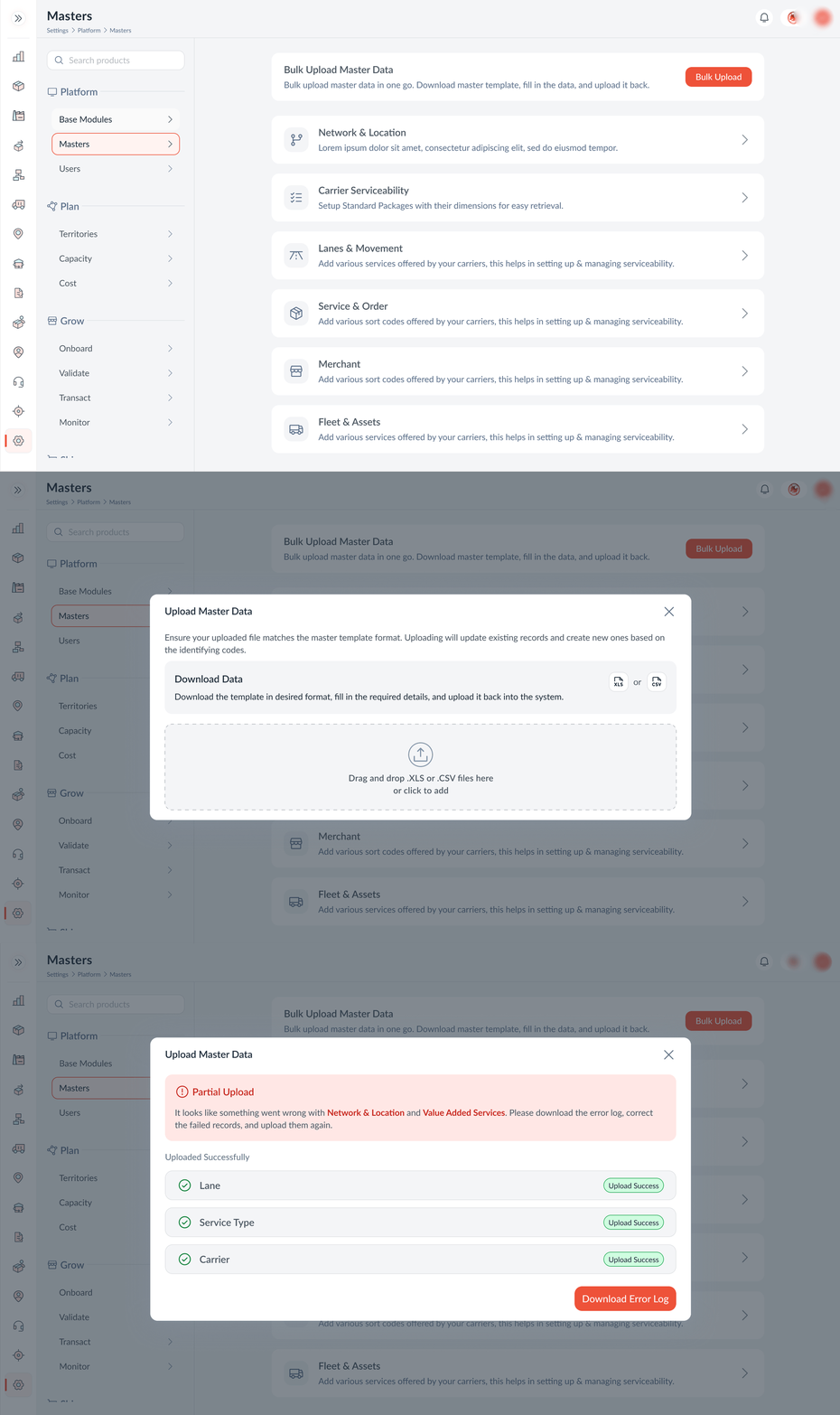
Managing master data is now faster and more accurate than ever. The Master's section in settings now features a simple, unified bulk upload tool for all masters. Users can easily drag and drop .XLS or .CSV files to add or update records in one go. The system tracks progress, highlights any errors, and provides a downloadable error log to quickly fix mistakes, eliminating the hassle of manual data entry.
Ensure Accurate Assignments with Active Driver Tags
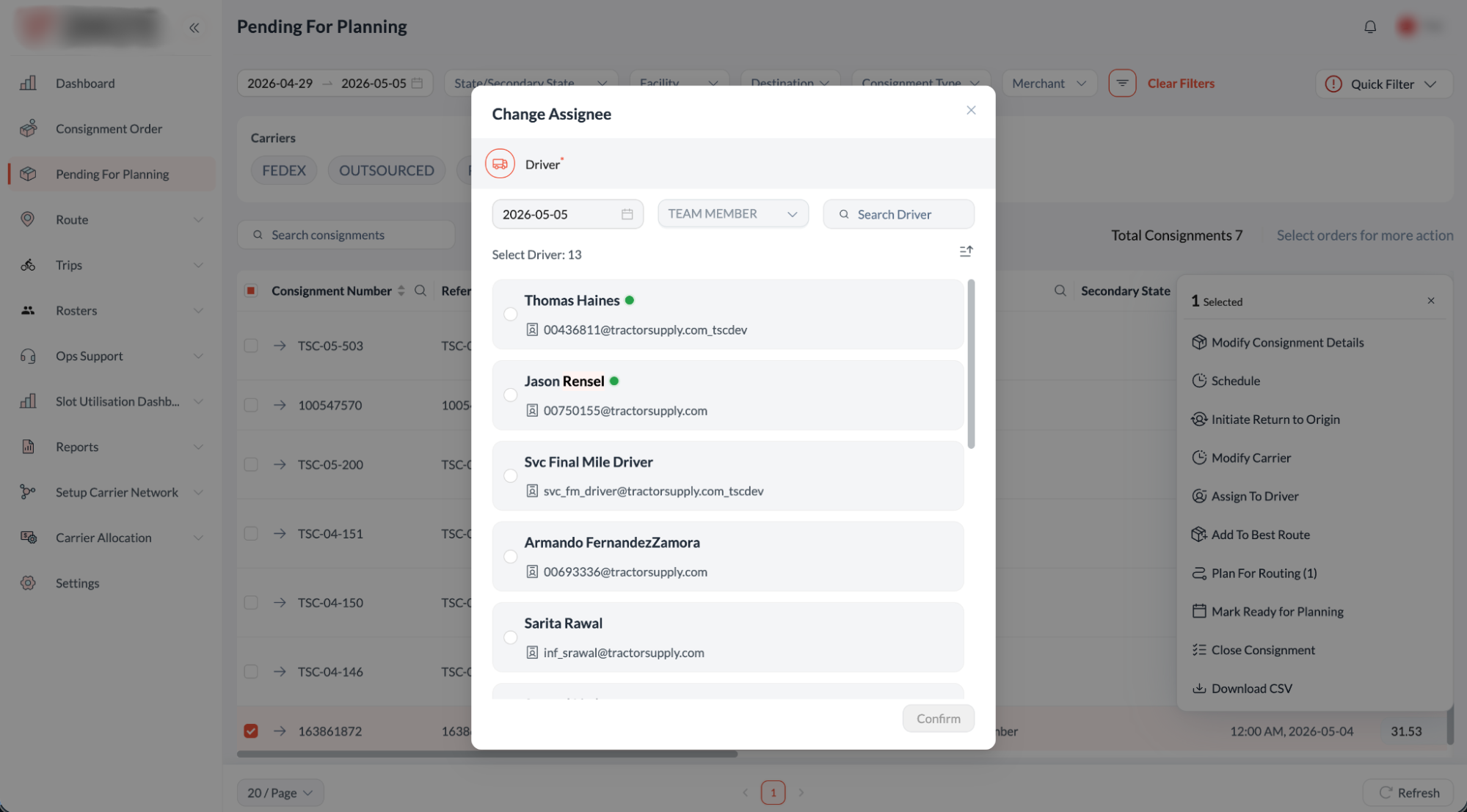
To help dispatchers avoid assigning tasks to unavailable drivers, the "Assign Driver" section in Pending for Planning now clearly tags active drivers with a green dot. The system also automatically sorts these available drivers to the very top of your list, keeping offline drivers at the bottom. This simple update ensures you only assign orders to available drivers, speeding up the dispatch process and preventing any accidental scheduling errors.
Smarter Route Resequencing with Live Capacity Visibility
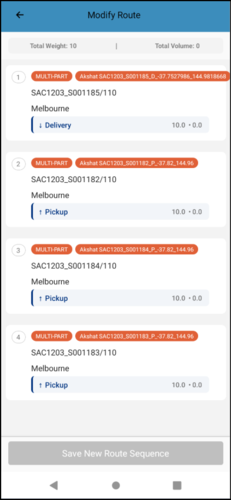
The route resequencing feature has been enhanced with real-time capacity tracking to help drivers use their vehicle space more efficiently. The resequencing page provides clear visibility into the weight, volume, and job type (pickup or delivery) for every stop, helping drivers make smart decisions to maximise their available vehicle space.
To guarantee operational compliance, the system continuously calculates the running weight and volume against the vehicle's total capacity, intelligently accounting for space freed up after a delivery or filled after a pickup. If a driver attempts to drag-and-drop a sequence that exceeds vehicle capacity or breaches a customer time window, the app instantly provides an alert, ensuring perfectly optimised and feasible routes without any guesswork.
Ensure Accurate Deliveries with AI-Powered POD Validation
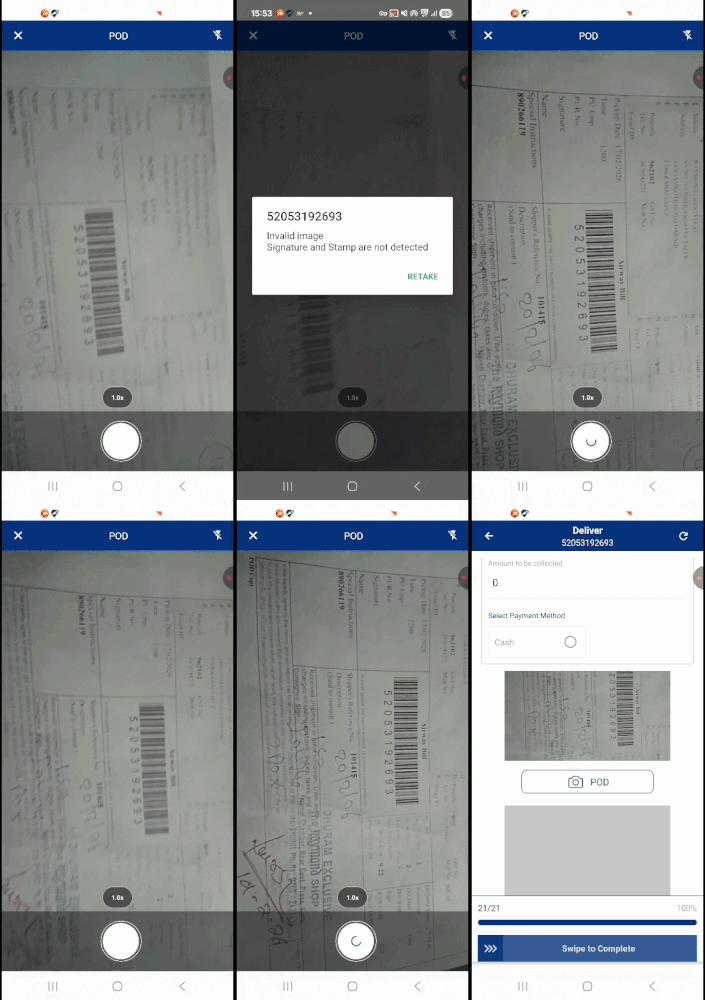
To improve the reliability of your delivery records, the mobile app now uses an advanced AI object-recognition model to double-check Proof of Delivery (POD) images. When a driver takes a photo, the system automatically scans it to ensure required elements like a valid signature, rubber stamp, or barcode are actually present.
Building on this scalable AI capability, you can now set up broader AI validation rules to automatically detect other specific visual identifiers, such as the driver's face, ID badges, the delivery house number, or the physical shipment itself. If any mandatory element is missing, the app instantly alerts the driver and forces them to retake the picture before they can complete the job.
Faster Order Preparation with Custom Pick Lists
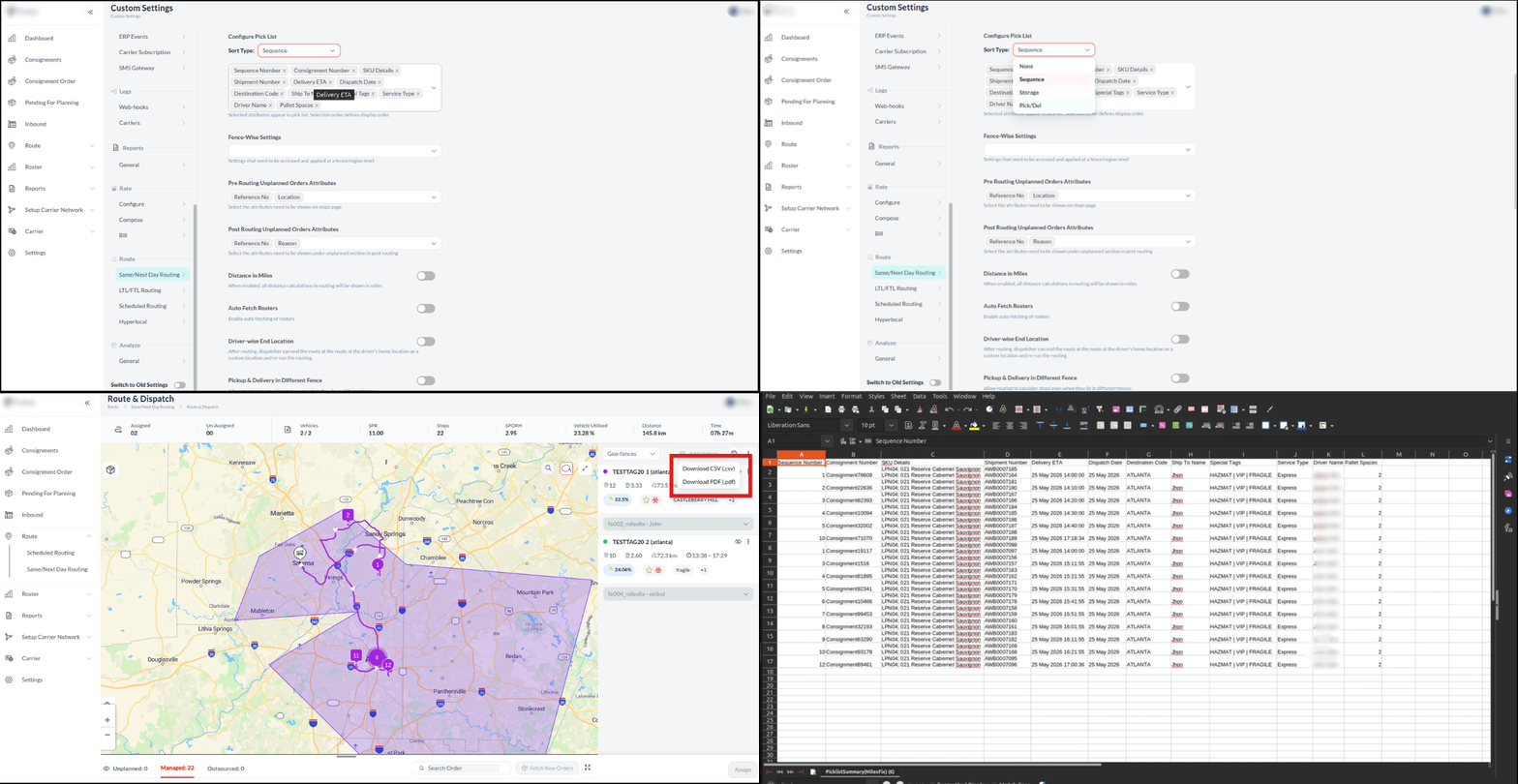
The pick list function now features fully customisable attributes, which help planners easily tailor order preparation. The system now supports data exports for PDF, Excel, and CSV formats. Planners can select up to 12 specific details to show on the printed or downloaded list, including the assigned driver name, storage location, and delivery ETA. Important handling rules, like 'Hazmat' or 'Fragile', now clearly stand out as icons. This simple update gives warehouse teams exactly the information they need at a glance, making daily loading much faster and easier.